Saturday, November 14, 2015

SOA 12.2.1 Quick look at Using In-Memory SOA to Improve System Performance

From this release SOA supports use of Coherence cache for persisting BPEL instances ,, as compared to database. This feature is controlled by using the property bpel.config.completionPersistPolicy for the process. The values for this property is immediate, deferred and faulted. This property specifies when the bpel instance can be moved to database from coherence cache. Immediate as the name suggests means the instance will not be stored in memory at all, deferred implies that the instance will be persisted later, by a background thread which runs at an interval of  5 minutes by default and faulted means only faulted instances will be persisted.
Read more here.Oracle Guide

Please note that in earlier releases we had a similar feature but the difference was when the instance was not saved in memory at all. We could decide when the instance details could be saved to database and how it could be saved. Also it was only applicable for transient process and was used in conjuction with inmemoryoptimization.

·         completionPersistLevel BPEL Property : This property controls the type and amount of data persisted after instance completion. By Default, all state (including variable values) are saved; this property can be set to save only instance metadata information. This property is valid only for Transient Processes.

Note: This property is used only when the inMemoryOptimization is set to true.

Values:

-          all (default): Oracle BPEL saves the complete instance, including the final variable values, work item data and audit data.
-          instanceheader: Oracle BPEL manager saves only the instance metadata.

Impact:

Ø  This property can greatly impact the database growth.
Ø  It can also impact the throughput (due to reduced I/O)

·         completionPersistPolicy BPEL Property :This property controls if and when to persist instances. If an instance is not saved, it does not appear in Oracle BPEL Control. This property is applicable to transient BPEL processes.

Note: This property is used only when the inMemoryOptimization is set to true.

Values:

-          on (default): Completed instances are saved normally.
-          deferred: Completed instances are saved in a difference thread and in a different transaction. If a server fails, some instances may not be saved.
-          Faulted:  Only faulted instances are saved.
-          Off: No instances (and their data) are saved.

Impact:

Ø  This property can greatly impact the database growth.

Ø  It can also impact the throughput (due to reduced I/O)


Following is an easy way to test the use of memory persistence in SOA Suite 12.2.1.


  1. Create a simple BPEL process. When creating the process choose the property deferred in the in memory SOA . 
  2. Notice that the source of composite.xml has the property listed under the bpel process.
  3. My bpel process just concats the input with hello and returns back the output.
  4. Before deploying this process we need to set the inMemoryEnvironment property to true from em console. Navigate to SOA-Infra->Administration->Common Properties->More SOA Infra advanced property.

  5. Deploy this BPEL process and Test it from SOAP-UI. Note that instance id is generated immediately but the instance is not available in the EM console. I fired the instance at approximately 9:00 PM. InstanceId is 30030.
  6. Checked the EM console and the instance was not available after two minutes.
  7. The instance was available after 5 minutes at 9:05 PM.

Hence we see that the process is being persisted in the DB after a five minutes of interval , helping to increase the performance.


Monday, November 2, 2015

SOA 12.2.1- Step by Step Instruction for Patching Running Instances of a Sample SOA Composite

Oracle SOA Suite 12c (12.2.1) supports Composite Instance Patching, which helps us to patch running instances of a composite and recover faulted instances after patching the runtime. Not all type of fixes are possible in a patch. In Jdeveloper the SOA Patch role is to be used for creating patches. Then wlst is used to deploying the patches.

I tried to create a sample BPEL process for testing the composite patching and below is outline and steps for the same. I created a simple BPEL process which sleeps for two minutes and then adds 5 to it. We will then patch it to add 55 to the input number. During the patching process there was a BPEL Instance in running state, once the patching was completed the BPEL process picked up the latest transformation.

Please note that for this Sample the integrated WebLogic domain will not work because the DB for MDS in this domain does not support versioning. I used XE database.

  1. Create a simple BPEL Process. In my case a one way process which sleeps for five minutes and then adds 5 to the input.

  2. Input = 6 and 5 was added to it. Output = 11
  3. Steps to create a PATCH. Switch to the Role SOA Patch Developer as shown below.
  4. This opens up the composite in the SOA Patch mode as shown below. See top right corner
  5. Open the BPEL process. The only activity which we can edit is a transformation in this case. The other activities like WAIT was like disabled state. This helps us in deciding what components can be edited.
  6. Open the transformation process and edit it
  7. Edit the transformation to add 55 to the input number.Save the transformation
  8. A patch file is then created at $Application-Home/$ProjectName/SOA/SCA-INF. This file has the information about the changed resource.
     
  9. File Contents
  10. Next we need to create the PATCH jar file. Right click on the project and choose deploy to SAR file. Deploy to Server will not work. For deploying we need to use WLST.
  11. We need to validate the patch now using wlst. Run the wlst.cmd from $MW_HOME/oracle_common/common/bin
  12. Validate the patch using the command. sca_validatePatch('http://localhost:23001','weblogic','weblogic1','C:\JDeveloper\mywork\SOAPatchSetSampleApplication\SamplePatchSetProject\deploy\sca_SamplePatchSetProject_patch.jar')
  13. When the patch was being deployed a process was in running state. The input for this was 45
  14. Deploy the Patch Jar file using the command. sca_patchComposite('http://localhost:23001','weblogic','weblogic1','C:\JDeveloper\mywork\SOAPatchSetSampleApplication\SamplePatchSetProject\deploy\sca_SamplePatchSetProject_patch.jar'

  15. When the process completed it added 55 to the input as per the new transformation
  16. All the new instances would also take the new transformation.
  17. In case you want to go back to the original project, come out of the patch mode you will need to delete the patch file. Choose delete the patch to work again on the project
  18. Patch Deleted
  19. Read more at Oracle SOA 12.2.1 Docs 

Tuesday, October 27, 2015

SOA Suite 12.2.1 is released. Below is the summary of New Features

SOA Suite 12.2.1 was released and below is the summary of new features.
·         Patch running instances of the composites.
This features enables us to patch the running instances of a composite and recover faulted instances after patching the runtime. However we can only include those fixes in the patch that are compatible with Composite Instance Patching.
To create the patch we need to use the SOA Patch Developer role in Oracle JDeveloper
This will help us to deliver urgent composite fixes that can be picked up by long running instances. This enables us to make changes without aborting in-flight instances. If a patched running instance comes across a business process that has been fixed by the patch, say a BPEL transformation, then it picks up the fixes applied to the business process. Read more here 

·         Support for in Memory SOA: Oracle has been pushing hard on coherence and this is one more example where coherence cache can be used. Using this feature the non-transactional business process as read and write operations are performed out of the cache as opposed to database in previous releases. The database performance and management also improves, as the costs associated with continuous disk reads and writes are significantly reduced. Read more here 


·         Debugging Improvements in XSLT mapper: Now we can debug our XSLT maps using the SOA Debugger. We can add breakpoints just like java at strategic locations in the XSLT map. During debugging, the debugger halts execution at the breakpoints, enabling us to verify the data and output.

·         Support for End-to-End JSON and JavaScript.  Now our SOA composites can use JSON from end to end. This means that now the REST service can receive the REST request and route it to the BPEL engine without translating it to XML. The BPEL component can use the JavaScript action, and also use JavaScript in conditional and iterative constructs, to work on JSON objects directly. The REST reference can receive the REST message from the BPEL engine and route it to an external REST endpoint without translation. Following are some of the features:-
    1. Enable End-to-End JSON
    2. Enable End-to-End JSON
    3. Enable REST support in new or existing services.
    4. Integrate with external REST APIs.
    5. Orchestrate a set of RESTful state transitions (RPC/Hypermedia as the Engine of Application State (HATEOAS) approach).
    6. Support for XML, JavaScript Object Notation (JSON) (with automatic translation to and from XML), text, opaque (binary), and URL-encoded payload data.
    7. Generation of sample URI for REST service operations.
    8. Support for WADL services. The WADL can be provided by a deployed Oracle SOA Suite or Oracle Service Bus service or a non-Oracle SOA Suite or Oracle Service Bus service such as a Jersey REST service.  Read more here 


Reference :- Oracle Docs

Monday, October 26, 2015

SOA Suite 12C - Resolve MBean attribute access denied. MBean: oracle.soa.config:name="default",j2eeType=SOAFolder,Application=soa-infra Error

Recently while working on a SOA 12C project I was seeing the following error in the logs.
<AdminServer> <[ACTIVE] ExecuteThread: '20' for queue: 'weblogic.kernel.Default (self-tuning)'> <<WLS Kernel>> <> <c3edacf6-49eb-407c-a03b-ac905a0a8ad1-000017eb> <1441380976786> <BEA-080003> <A RuntimeException was generated by the RMI server: javax.management.remote.rmi.RMIConnectionImpl.getAttribute(Ljavax.management.ObjectName;Ljava.lang.String;Ljavax.security.auth.Subject;)
javax.management.RuntimeMBeanException: java.lang.SecurityException: MBean attribute access denied.
MBean: oracle.soa.config:name="default",j2eeType=SOAFolder,Application=soa-infra
Getter for attribute State
Detail: access denied ("oracle.fabric.permission.CompositePermission" "default" "read").
javax.management.RuntimeMBeanException: java.lang.SecurityException: MBean attribute access denied.


On : 12.1.3.0.0 version, Fabric

MBean attribute access denied. Warning/Errors seen in the Admin/SOA domain logs

The Admin/SOA domain server logs are repeatedly filled with MBean attribute access denied warnings. It doesn't affect the deployment or composites during runtime. The user is not logging as weblogic but as ohscustadmin.

<Warning> <RMI> <hostname> <AdminServer> <[ACTIVE] ExecuteThread: '20' for queue: 'weblogic.kernel.Default (self-tuning)'> <<WLS Kernel>> <> <c3edacf6-49eb-407c-a03b-ac905a0a8ad1-000017eb> <1441380976786> <BEA-080003> <A RuntimeException was generated by the RMI server: javax.management.remote.rmi.RMIConnectionImpl.getAttribute(Ljavax.management.ObjectName;Ljava.lang.String;Ljavax.security.auth.Subject;)
javax.management.RuntimeMBeanException: java.lang.SecurityException: MBean attribute access denied.
MBean: oracle.soa.config:name="default",j2eeType=SOAFolder,Application=soa-infra
Getter for attribute State
Detail: access denied ("oracle.fabric.permission.CompositePermission" "default" "read").
javax.management.RuntimeMBeanException: java.lang.SecurityException: MBean attribute access denied.


ERROR
-----------------------
[oracle.as.jmx.framework.generic.spi.security.AbstractMBeanSecurityInterceptor] [tid: [ACTIVE].ExecuteThread: '0' for queue: 'weblogic.kernel.Default (self-tuning)'] [userId: odemmon] [ecid: f66cbcbf-ba3c-48da-8cde-f3d7578fcda2-00023944,0] [APP: soa-infra] MBean attribute access denied. [[
MBean: oracle.as.soainfra.config:name=soa-infra,type=SoaInfraConfig,Application=soa-infra
Getter for attribute NonFatalConnectionMaxRetry
Detail: access denied ("oracle.fabric.permission.SOAPlatformPermission" "read") java.security.AccessControlException: access denied ("oracle.fabric.permission.SOAPlatformPermission" "read")
at java.security.AccessControlContext.checkPermission(AccessControlContext.java:372)
at java.security.AccessController.checkPermission(AccessController.java:559)
at oracle.security.jps.util.JpsAuth$AuthorizationMechanism$3.checkPermission(JpsAuth.java:472)
at oracle.security.jps.util.JpsAuth.checkPermission(JpsAuth.java:532)
at oracle.security.jps.util.JpsAuth.checkPermission(JpsAuth.java:558)
at oracle.fabric.permission.internal.InternalSOAPermissionCheckHelper$2.run(InternalSOAPermissionCheckHelper.java:202)
at java.security.AccessController.doPrivileged(Native Method)
at javax.security.auth.Subject.doAs(Subject.java:415)
at oracle.fabric.permission.internal.InternalSOAPermissionCheckHelper.internalCheckSOAPermission(InternalSOAPermissionCheckHelper.java:200)
at oracle.fabric.permission.internal.InternalSOAPermissionCheckHelper.checkSOAPermission(InternalSOAPermissionCheckHelper.java:171)
at oracle.fabric.permission.management.SOAPermissionCheckPluginFactory$SOAMBeanCustomSecurityPlugin.checkGetAttribute(SOAPermissionCheckPluginFactory.java:60)
at oracle.as.jmx.framework.MBeanCustomSecurityHelper.checkGetAttribute(MBeanCustomSecurityHelper.java:193)
at oracle.as.jmx.framework.generic.spi.security.AbstractMBeanSecurityInterceptor.checkAttributeAccess(AbstractMBeanSecurityInterceptor.java:264)
at oracle.as.jmx.framework.generic.spi.security.AbstractMBeanSecurityInterceptor.internalGetAttributes(AbstractMBeanSecurityInterceptor.java:138)
at oracle.as.jmx.framework.generic.spi.interceptors.AbstractMBeanInterceptor.doGetAttributes(AbstractMBeanInterceptor.java:114)
at oracle.security.jps.ee.jmx.JpsJmxInterceptor$GetAttributesDelegator.delegate(JpsJmxInterceptor.java:959)
at oracle.security.jps.ee.jmx.JpsJmxInterceptor$7.run(JpsJmxInterceptor.java:826)
at java.security.AccessController.doPrivileged(Native Method)
at oracle.security.jps.util.JpsSubject.doAsPrivileged(JpsSubject.java:315)
at oracle.security.jps.ee.util.JpsPlatformUtil.runJaasMode(JpsPlatformUtil.java:460)
at oracle.security.jps.ee.jmx.JpsJmxInterceptor.jpsInternalInvoke(JpsJmxInterceptor.java:868)
at oracle.security.jps.ee.jmx.JpsJmxInterceptor.internalGetAttributes(JpsJmxInterceptor.java:217)
at oracle.as.jmx.framework.generic.spi.interceptors.AbstractMBeanInterceptor.doGetAttributes(AbstractMBeanInterceptor.java:114)
at oracle.as.jmx.framework.generic.spi.interceptors.ContextClassLoaderMBeanInterceptor.internalGetAttributes(ContextClassLoaderMBeanInterceptor.java:115)
at oracle.as.jmx.framework.generic.spi.interceptors.AbstractMBeanInterceptor.doGetAttributes(AbstractMBeanInterceptor.java:114)
at oracle.as.jmx.framework.generic.spi.interceptors.MBeanRestartInterceptor.internalGetAttributes(MBeanRestartInterceptor.java:87)
at oracle.as.jmx.framework.generic.spi.interceptors.AbstractMBeanInterceptor.doGetAttributes(AbstractMBeanInterceptor.java:114)
at oracle.as.jmx.framework.standardmbeans.spi.OracleStandardEmitterMBean.getAttributes(OracleStandardEmitterMBean.java:654)
at oracle.as.jmx.framework.standardmbeans.spi.OracleStandardEmitterConfigMBean.getAttributes(OracleStandardEmitterConfigMBean.java:620)
at com.sun.jmx.interceptor.DefaultMBeanServerInterceptor.getAttributes(DefaultMBeanServerInterceptor.java:709)
at com.sun.jmx.mbeanserver.JmxMBeanServer.getAttributes(JmxMBeanServer.java:705)
at weblogic.management.jmx.mbeanserver.WLSMBeanServerInterceptorBase$13.run(WLSMBeanServerInterceptorBase.java:353)
at java.security.AccessController.doPrivileged(Native Method)
at weblogic.management.jmx.mbeanserver.WLSMBeanServerInterceptorBase.getAttributes(WLSMBeanServerInterceptorBase.java:351)
at weblogic.management.mbeanservers.internal.JMXContextInterceptor.getAttributes(JMXContextInterceptor.java:192)
at weblogic.management.jmx.mbeanserver.WLSMBeanServerInterceptorBase$13.run(WLSMBeanServerInterceptorBase.java:353)
at java.security.AccessController.doPrivileged(Native Method)
at weblogic.management.jmx.mbeanserver.WLSMBeanServerInterceptorBase.getAttributes(WLSMBeanServerInterceptorBase.java:351)
at weblogic.management.mbeanservers.internal.SecurityInterceptor.getAttributes(SecurityInterceptor.java:308)
at weblogic.management.jmx.mbeanserver.WLSMBeanServer.getAttributes(WLSMBeanServer.java:292)
at weblogic.management.mbeanservers.internal.JMXConnectorSubjectForwarder$6$1.run(JMXConnectorSubjectForwarder.java:383)
at weblogic.management.mbeanservers.internal.JMXConnectorSubjectForwarder$6$1.run(JMXConnectorSubjectForwarder.java:381)
at java.security.AccessController.doPrivileged(Native Method)
at weblogic.management.mbeanservers.internal.JMXConnectorSubjectForwarder$6.run(JMXConnectorSubjectForwarder.java:381)
at weblogic.security.acl.internal.AuthenticatedSubject.doAs(AuthenticatedSubject.java:363)
at weblogic.management.mbeanservers.internal.JMXConnectorSubjectForwarder.getAttributes(JMXConnectorSubjectForwarder.java:376)
at javax.management.remote.rmi.RMIConnectionImpl.doOperation(RMIConnectionImpl.java:1468)
at javax.management.remote.rmi.RMIConnectionImpl.access$300(RMIConnectionImpl.java:97)
at javax.management.remote.rmi.RMIConnectionImpl$PrivilegedOperation.run(RMIConnectionImpl.java:1328)
at java.security.AccessController.doPrivileged(Native Method)
at javax.management.remote.rmi.RMIConnectionImpl.doPrivilegedOperation(RMIConnectionImpl.java:1427)
at javax.management.remote.rmi.RMIConnectionImpl.getAttributes(RMIConnectionImpl.java:693)
at javax.management.remote.rmi.RMIConnectionImpl_WLSkel.invoke(Unknown Source)
at weblogic.rmi.internal.BasicServerRef.invoke(BasicServerRef.java:701)
at weblogic.rmi.internal.BasicServerRef$1.run(BasicServerRef.java:527)
at weblogic.security.acl.internal.AuthenticatedSubject.doAs(AuthenticatedSubject.java:363)
at weblogic.security.service.SecurityManager.runAs(SecurityManager.java:146)
at weblogic.rmi.internal.BasicServerRef.handleRequest(BasicServerRef.java:523)
at weblogic.rmi.internal.wls.WLSExecuteRequest.run(WLSExecuteRequest.java:118)
at weblogic.work.ExecuteThread.execute(ExecuteThread.java:311)
at weblogic.work.ExecuteThread.run(ExecuteThread.java:263)


Raised an Oracle SR and the solution provided by them was :-


1) Login into WLS console
2) select the domain -> security -> Embedded LDAP
3) Make sure "Refresh Replica At Startup " is enabled
4) save changes & restart all servers

enjoy!!

Saturday, July 11, 2015

Oracle Access Manager Create A WebService for Authentication using Access Gate

Creating a Access Gate using OAM11gR2

The oracle documentation has proper steps for creating a custom Access Gate  but it lacks on steps on how to deploy it . Recently I had to create a Webservice for authentication from OAM using custom access gate and it took a while to deploy it. Below are the brief steps on how to create one. The code was created using eclipse. 

  1. Download ASDK from edelivery.oracle.com. We were using OAM 11gR2 Bp04 but could not find ASDK for the same version. We download the version 11.1.2.2.2 and it worked for us.  
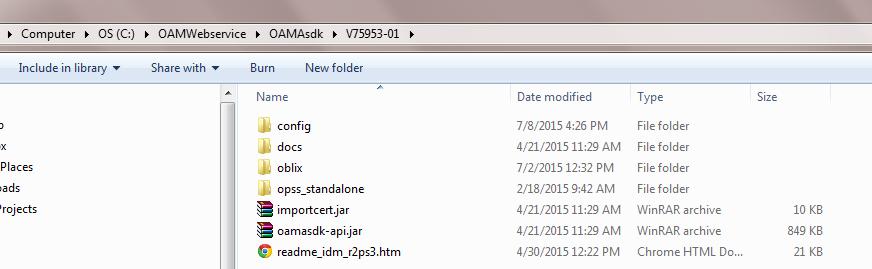
  2. Unzip the contents to a directory.
  3. Create a webservice project in Eclipse
  4. Project Name Used : OamAuthenticationService
  5. In the project class path add the following jar files.
  6. Add the oamasdk-api.jar in the web-inf/lib folder.
  7. Copy the ObAccessClient.xml file to ASDK/oblix/lib folder.(I had a 10 g webgate hence only ObAccessClient.xml) else we need to copy cwallet.sso as well.
  8. For running the code as a standalone java program you need to add jps-config.xml as well under the folder ASDK/config.

  9. Contents of the jps-config.xml should be updated to reflect the Access Gate name.
  10. Write the java code as per the oracle doc. Oracle Doc
  11. I am reading the ASDK location and Access Gate name from properties file. The resource name (ms_resource) should be of the format Access Gate Name from OAM Console /resource.For e.g. in my case the name is http://OAMASDK/fed. Refer screen shot in step 7.
  12. Contents of the properties file:-Note the location is folder where you unzipped the ASDK contents.
  13. Thats all what is required to test the app as a standalone java program.
  14. In order to deploy this to a server with JRF environment there are some further modifications which need to be done. 
  15. Failing to do this may result in run time exceptions like class definitions not found. Create a weblogic.xml file under WEB-INF folder if it does not exist. Add the following contents to the file.<?xml version="1.0" encoding="UTF-8"?>
    <wls:weblogic-web-app xmlns:wls="http://xmlns.oracle.com/weblogic/weblogic-web-app" xmlns:xsi="http://www.w3.org/2001/XMLSchema-instance" xsi:schemaLocation="http://java.sun.com/xml/ns/javaee http://java.sun.com/xml/ns/javaee/web-app_2_5.xsd http://xmlns.oracle.com/weblogic/weblogic-web-app http://xmlns.oracle.com/weblogic/weblogic-web-app/1.3/weblogic-web-app.xsd">
        <wls:weblogic-version>10.3.6</wls:weblogic-version>
        <wls:context-root>OAMAuthenticationService</wls:context-root>
        <wls:container-descriptor>
        <wls:prefer-application-packages>
     <!-- add package names from the Oracle Access Server SDK -->

     <wls:package-name>oracle.security.am.*</wls:package-name>
        </wls:prefer-application-packages>
      </wls:container-descriptor>
    </wls:weblogic-web-app>
  16. On the server where we intend to deploy the WAR file , in  $domain_home/config/fmwconfig folder locate system-jazn.xml file.
  17. Take a back up of the current file and add an entry in the file as follows. Make sure the entry is done under <jazn-policy> section and not under <admin-policy> category.If this entry is not done properly you will get an exception oracle.secuirty. jps.access denied. The file location should be from the tmp folder and the folder name should be the project name. Do not forget a "/-" in the end. <grant>
    <grantee>
    <codesource>
    <url>file:${domain.home}/servers/${weblogic.Name}/tmp/_WL_user/OAMAuthenticationService/-</url>
    </codesource>
    </grantee>
    <permissions>
    <permission>
    <class>oracle.security.jps.service.credstore.CredentialAccessPermission</class>
    <name>context=SYSTEM,mapName=OAMAgent,keyName=*</name>
    <actions>read</actions>
    </permission>
    </permissions>
    </grant> 
  18. Move the ASDK to the server machine and update the path in the java code as required.The jps-config.xml file placed under config folder in step 8 needs to be removed from the ASDK on the server machine.
  19. In the generated war file check that the oamasdk-api.jar is included in the web-inf/lib folder.
  20. Deploy the WAR
  21. Thats all and you should be all good to go.

Wednesday, January 28, 2015

SOA Suite - Adding an existing Database MDS connection to a new Application

When we store artifacts like XSDs in database MDS and want to reuse it in a new SOA application following are the steps which we need to follow.


  1. Once the SOA application is created expand the IDE connections ->SOA-MDS and right click on the MDS connection and select the option Add to Application.
  2. Once "Add to Application" is finished in the left hand side of the Jdeveloper find Application Resources , expand->Descriptors->ADF META-INF->adf-config.xml.
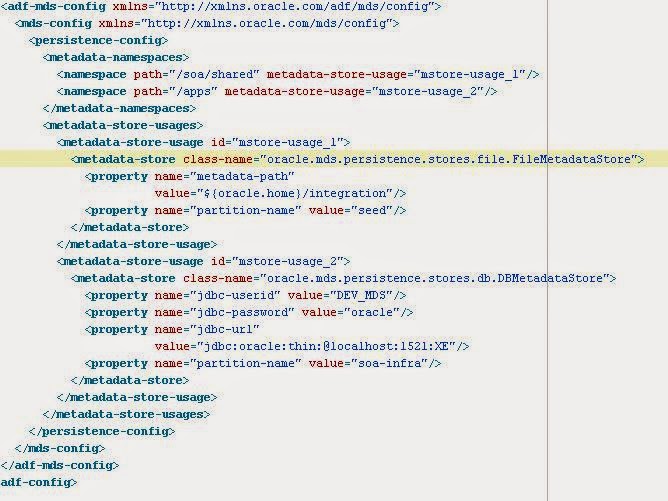
  3. Open the adf-config.xml and look for the mds connection name "mstore-usage_2". Many a time this entry does not exist and you may need to manually edit the xml file like below.
  4. Add the line  <namespace path="/apps" metadata-store-usage="mstore-usage_2"/> under  <metadata-namespaces>.
  5. Navigate to  <metadata-store-usages> and add the entry for "mstore-usage_2" if it does noe exists. If the entry exists make sure the entry for MDS password. <property name="jdbc-password" value="oracle"/>. More than often you need to add it manually.
                 <metadata-store-usage id="mstore-usage_2">
                <metadata-store class-name="oracle.mds.persistence.stores.db.DBMetadataStore">
                  <property name="jdbc-userid" value="DEV_MDS"/>
                  <property name="jdbc-password" value="oracle"/>
                  <property name="jdbc-url"
                            value="jdbc:oracle:thin:@localhost:1521:XE"/>
                  <property name="partition-name" value="soa-infra"/>
                </metadata-store>
              </metadata-store-usage>
  6. Sample XML File.